Clock in. Roster. Pay.
One app.
Staff clock in from their phone. You roster, approve, and send hours to Xero. Award pay rules stay current from Fair Work — you never look them up again.
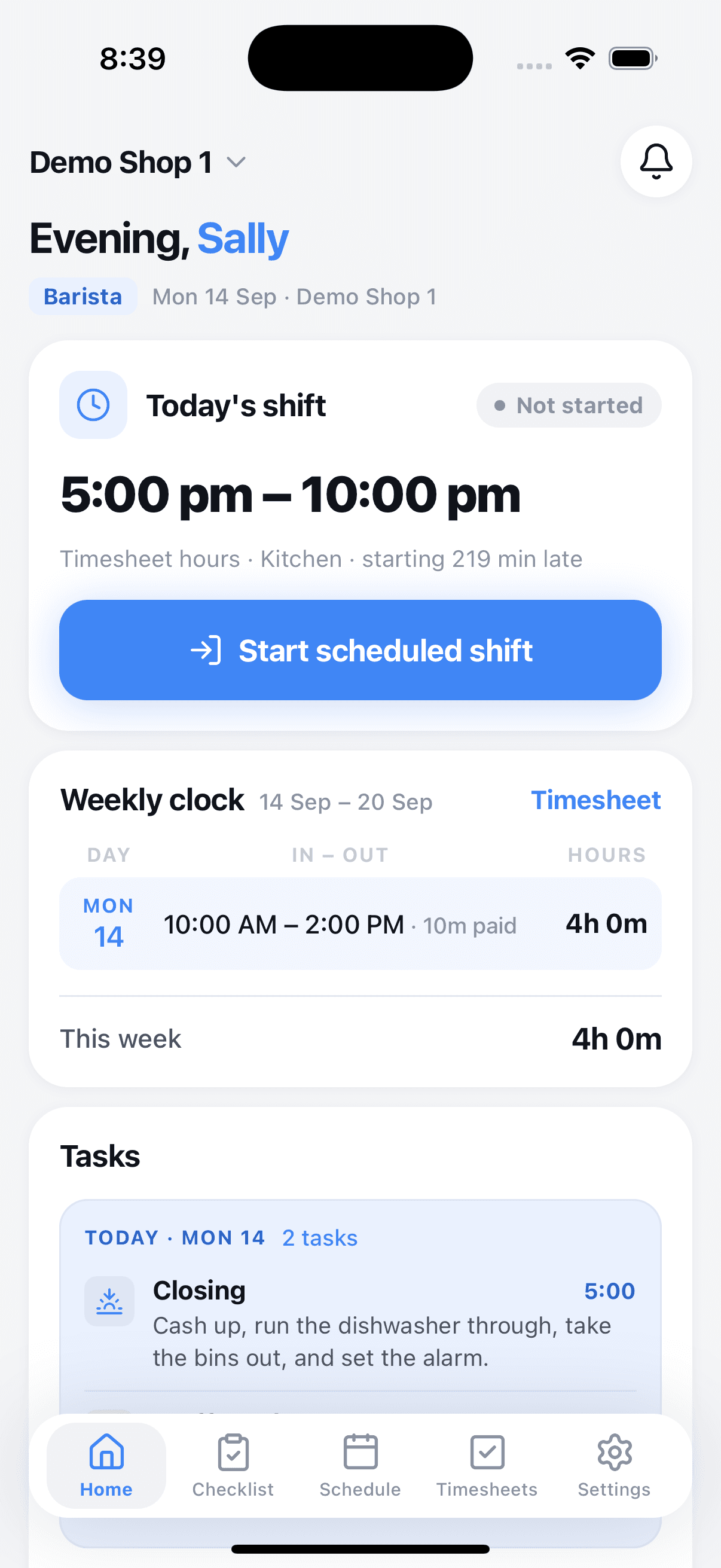
The shops that run on Dowoomi every day



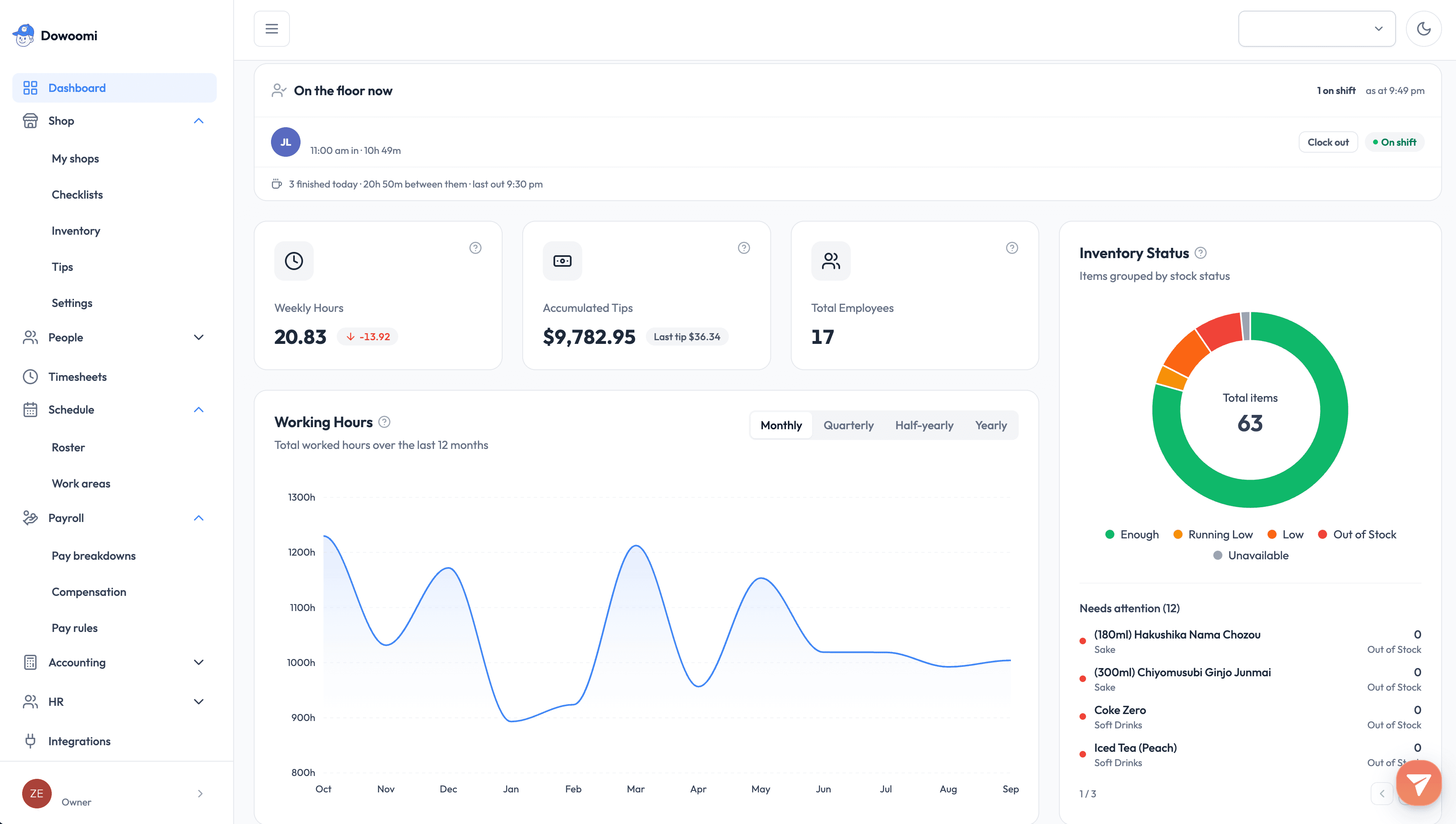
Staff clock in from their own phone.
No kiosk, no tablet by the door. Each person taps in on their phone; you see who is on shift right now, from anywhere.
- On-device geofenceThe phone checks it is inside your shop's radius before the button works. The location itself never leaves the phone — we don't store it.
- Multiple clock-ins a daySplit shifts, breaks, a run to the bank. Every in and out is a separate record, so timesheets add up exactly.
- Guest workers, no account neededA trial hire or a one-day casual can clock in from a link for two weeks. Add them as staff later, or let them drop off. Guests are never billed.
- Live 'who's in' boardOwners and managers see current clock-ins per shop, updated the moment someone taps.
Build the week in minutes, publish once.
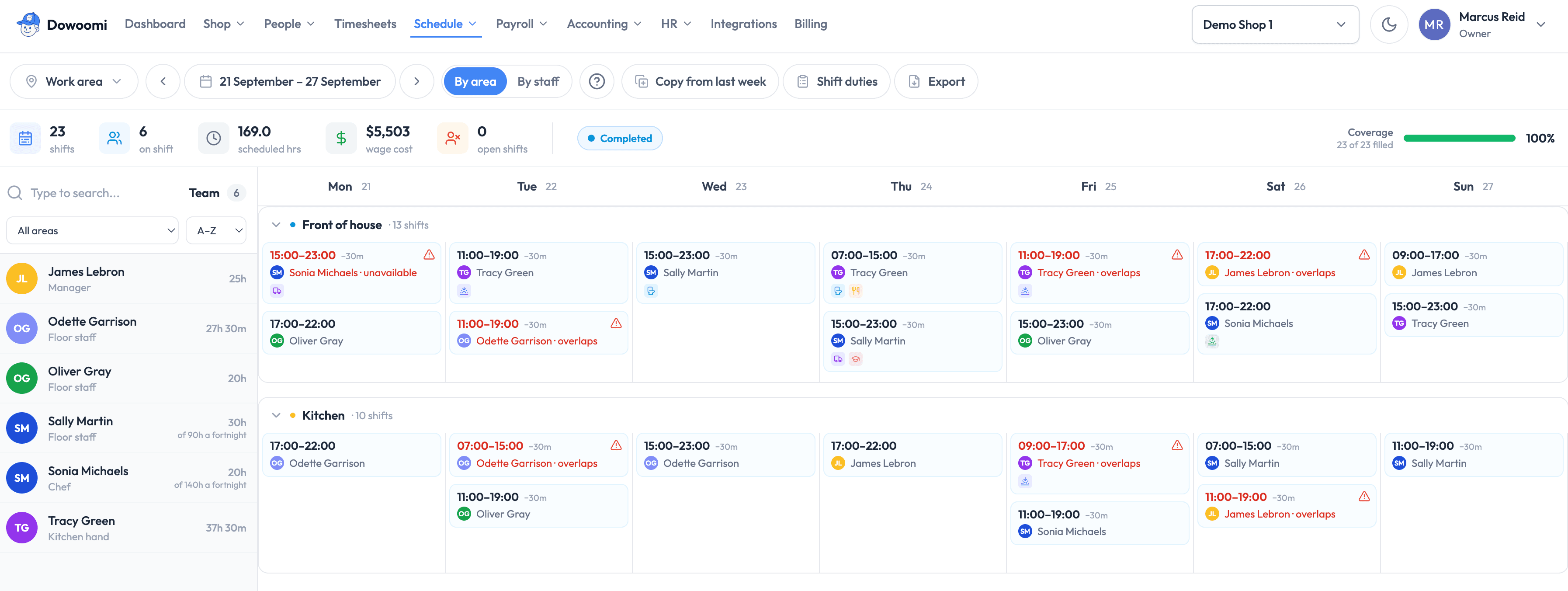
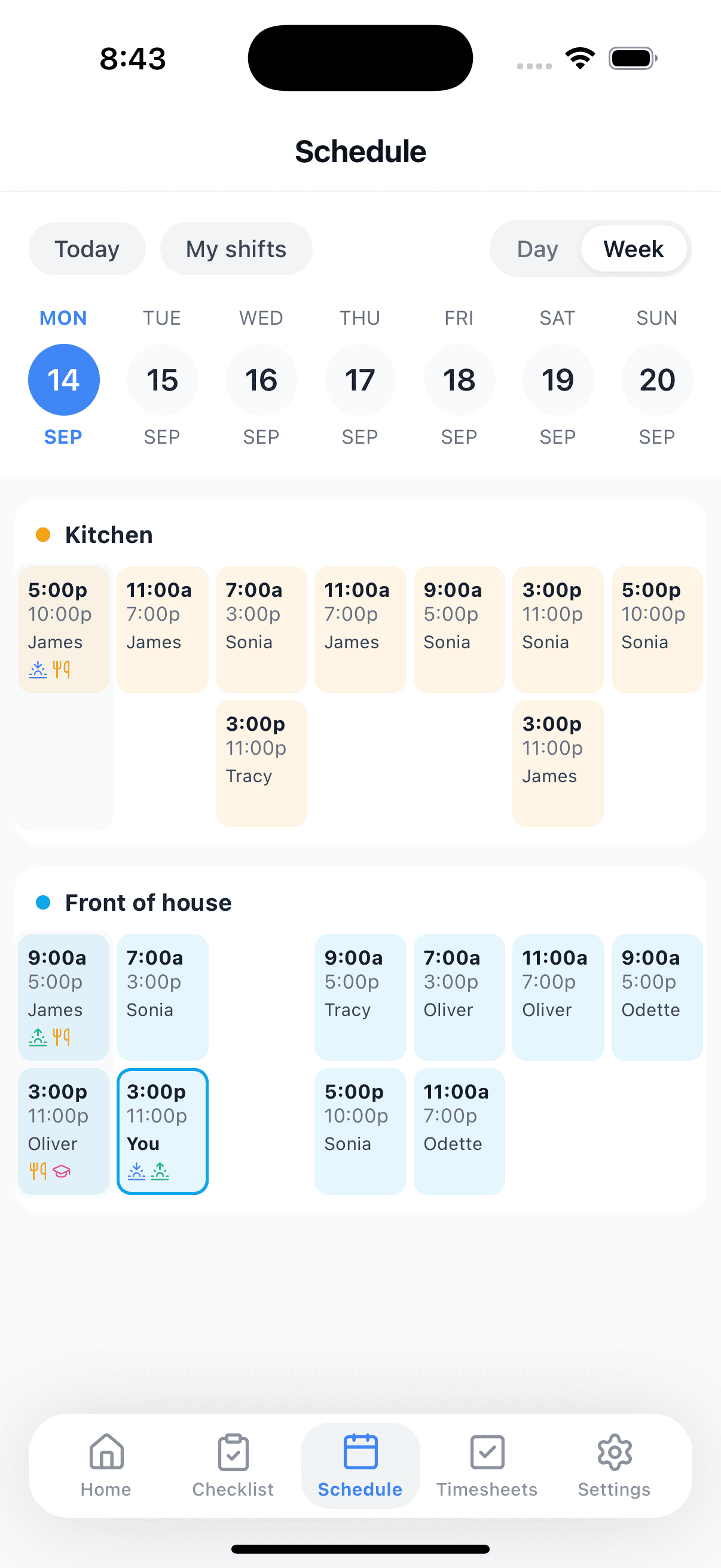
Drag shifts onto the week by work area. Publish, and every staff member gets a push notification with their shifts. Cost shows before you commit.
- Drag-and-drop weekly rosterRosters per shop and work area. Copy last week, adjust, done. Owners and managers can build it from the app too.
- Wage cost as you buildProThe roster shows what the week will cost using each person's rate and the award rules — before you publish.Pro
- Availability and leave in one viewProStaff set when they can work and request leave in the app. The roster warns you before you put someone on a shift they said they cannot do.Pro
- Legal hour caps respectedA student visa's fortnightly cap, or a weekly or fortnightly limit you set per person. The roster warns you when a shift would push them over.
- Shift cover requestsStaff who cannot make a shift ask colleagues from the app. The first to accept takes it, and the roster updates. You can require your approval first.
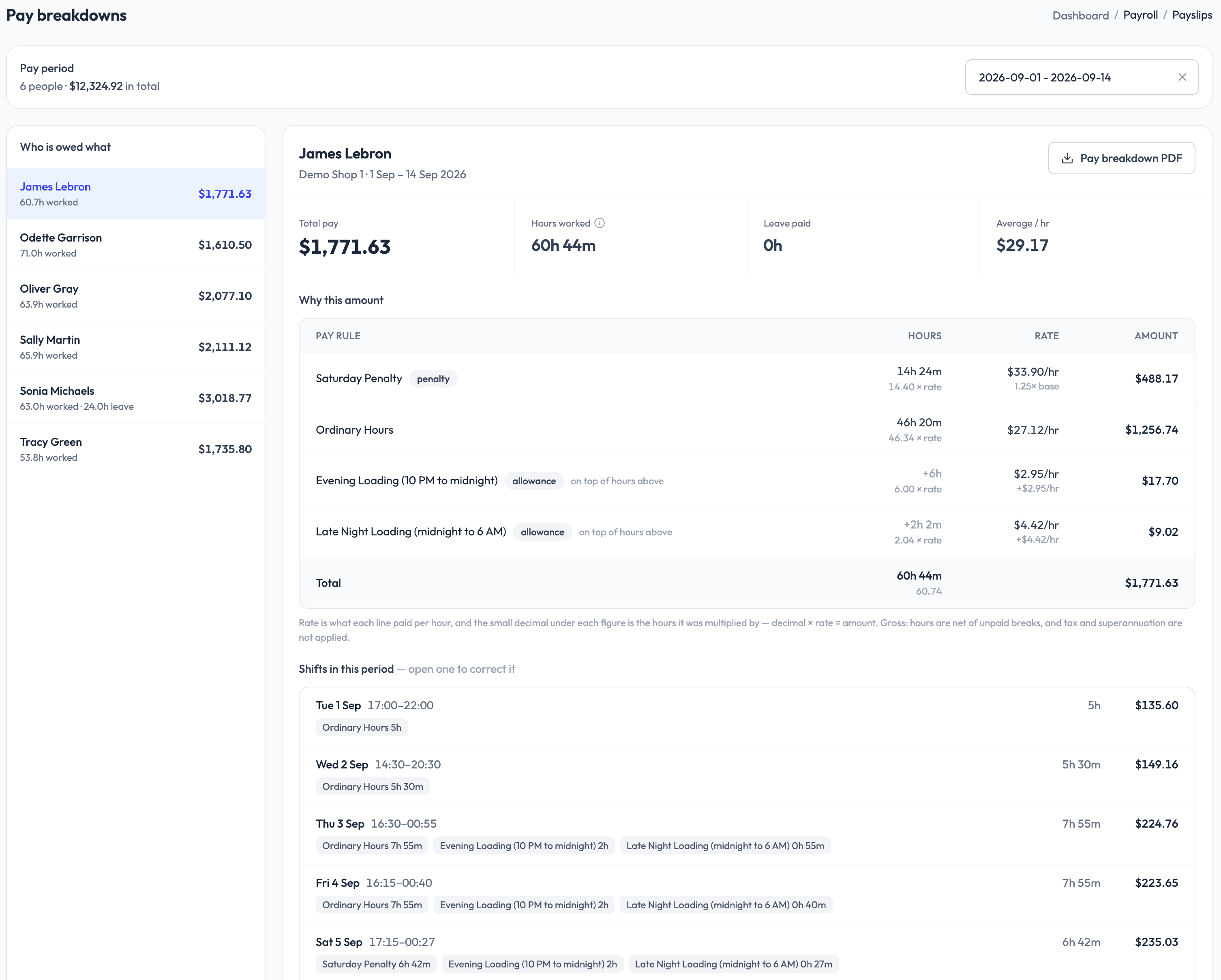
Hours in, Xero out.
Timesheets build themselves from clock-ins. Award rules turn hours into the right rates. One click sends approved hours to Xero Payroll — you run pay there as usual.
- Australian award pay rulesProPenalty rates, overtime, casual loading and allowances from the modern award that applies to you. When Fair Work varies the award, the pay rules update and you are told.Pro
- Timesheets and PDF exportWeekly or any period, per person or per shop. Free plan includes PDF; Pro can email them.
- Xero payroll integrationProApproved hours arrive in Xero as draft timesheets, mapped to the right earnings rates. You approve and run pay in Xero. Payslips and STP stay in Xero.Pro
- Organisation viewProPeople, leave, compliance, pay run, timesheets and reports across every shop you own, in one place.Pro
Don't miss a call when you are busy.
Keep your phone number. When you cannot answer, at break time or in the peak rush, the AI picks up, answers questions about your shop and takes the booking or a takeaway order.
- Keep your phone number, nothing changes for guests
- Picks up when you cannot: break time, peak time
- Alerts go to the staff on shift right now
SoonFull AI front desk, answering every call first, is coming soon.
Incoming call
Not picked up in the dinner rush · AI answered · 7:12 pm
Guest: Hi, can I get a table for four at 7:30 tonight?
AI: Yes, we have a table for four at 7:30. Can I get a name and mobile number?
Guest: Sarah, 0412 345 678.
AI: Done. Four people at 7:30 tonight under Sarah. See you then!
Booking added · Table for 4 · 7:30 pm
Set up Dowoomi in three steps.
Create your shop
Sign up, name your shop, set the address. Two minutes, no card.
Invite your team
Send the app link. Staff sign in, you approve them once, they can clock in.
Roster, approve, send
Publish the week, approve the timesheets, send to Xero. Clock in and rosters are free for one shop; Pro adds award rates and Xero.
Pay for who works.
Free while your shop is small. Pro counts only the people who clocked in or were rostered that month. Someone who did neither costs you nothing.
Pro is billed monthly for the month just finished, from what your team actually did. Nobody rostered, nobody clocked in, nothing to pay.
Pro
$5
per active employee, per month
Every feature, per company. Includes AI Voicemail for every shop, free for 6 months. No minimum, no lock-in. 30 days free, cancel anytime before it ends.
Enterprise
Custom
Volume pricing on invoice for larger groups.
| Shops and people | |||
|---|---|---|---|
| Shops | 1 | Unlimited | Unlimited |
| Employees | Unlimited | Unlimited | Unlimited |
| Guest workers, per shopA trial hire or a one-day casual can clock in from a link for two weeks. Add them as staff later, or let them drop off. Guests are never billed. | 3 | 10 | 10 |
| Time and attendance | |||
| Clock in and out from their phoneSplit shifts, breaks, a run to the bank. Every in and out is a separate record, so timesheets add up exactly. | Included in Free | Included in Pro | Included in Enterprise |
| On-device geofence (location never stored)The phone checks it is inside your shop's radius before the button works. The location itself never leaves the phone — we don't store it. | Included in Free | Included in Pro | Included in Enterprise |
| Live 'who's in' boardOwners and managers see current clock-ins per shop, updated the moment someone taps. | Included in Free | Included in Pro | Included in Enterprise |
| Timesheets and PDF exportWeekly or any period, per person or per shop. Free plan includes PDF; Pro can email them. | Included in Free | Included in Pro | Included in Enterprise |
| Email timesheets | Included in Free | Included in Pro | Included in Enterprise |
| Running the shop | |||
| Opening and closing checklistsMorning, close or any routine you repeat, for the whole shop, a work area or named people. Staff tick items off in the app and you see who did what. | Included in Free | Included in Pro | Included in Enterprise |
| Tasks on each shift | Included in Free | Included in Pro | Included in Enterprise |
| InventoryA count and a status (enough, running low, low, out of stock) for every item, per shop. Staff update both from the app. | Included in Free | Included in Pro | Included in Enterprise |
| Tip poolingRecord the day's tips and split the pool among the people who worked it, three ways: by hours worked, equally, or by points. Points are 1 to 5 per person (0 means no tips), times hours worked, with a shop default you can change for one day. Pick any period and get one figure per person. | Included in Free | Included in Pro | Included in Enterprise |
| Announcements to staffProPush a message to your staff's phones, per shop, to everyone or the people you pick: new menu, public holiday hours, anything. | Not included in Free | Included in Pro | Included in Enterprise |
| Rostering and pay | |||
| Rostering, published to staffRosters per shop and work area. Copy last week, adjust, done. Owners and managers can build it from the app too. | Included in Free | Included in Pro | Included in Enterprise |
| Work areas, published one at a time | Included in Free | Included in Pro | Included in Enterprise |
| Legal hour caps respectedA student visa's fortnightly cap, or a weekly or fortnightly limit you set per person. The roster warns you when a shift would push them over. | Included in Free | Included in Pro | Included in Enterprise |
| Leave and availabilityProStaff set when they can work and request leave in the app. The roster warns you before you put someone on a shift they said they cannot do. | Not included in Free | Included in Pro | Included in Enterprise |
| Shift cover requestsStaff who cannot make a shift ask colleagues from the app. The first to accept takes it, and the roster updates. You can require your approval first. | Included in Free | Included in Pro | Included in Enterprise |
| Australian award pay rules, kept current from Fair WorkProPenalty rates, overtime, casual loading and allowances from the modern award that applies to you. When Fair Work varies the award, the pay rules update and you are told. | Not included in Free | Included in Pro | Included in Enterprise |
| Xero payroll integrationProApproved hours arrive in Xero as draft timesheets, mapped to the right earnings rates. You approve and run pay in Xero. Payslips and STP stay in Xero. | Not included in Free | Included in Pro | Included in Enterprise |
| Organisation view across every locationProPeople, leave, compliance, pay run, timesheets and reports across every shop you own, in one place. | Not included in Free | Included in Pro | Included in Enterprise |
| Support and integrations | |||
| AI Voicemail for every shop (30 minutes a month) | Not included in Free | Free for 6 months, then A$10 a shop | Free for 6 months, then A$10 a shop |
| Dedicated support | Not included in Free | Included in Pro | Included in Enterprise |
| Custom integrations and API access | Not included in Free | Not included in Pro | Included in Enterprise |
| Invoice billing | Not included in Free | Not included in Pro | Included in Enterprise |
- Shops1
- EmployeesUnlimited
- Guest workers, per shopA trial hire or a one-day casual can clock in from a link for two weeks. Add them as staff later, or let them drop off. Guests are never billed.3
- Clock in and out from their phoneSplit shifts, breaks, a run to the bank. Every in and out is a separate record, so timesheets add up exactly.Included in Free
- On-device geofence (location never stored)The phone checks it is inside your shop's radius before the button works. The location itself never leaves the phone — we don't store it.Included in Free
- Live 'who's in' boardOwners and managers see current clock-ins per shop, updated the moment someone taps.Included in Free
- Timesheets and PDF exportWeekly or any period, per person or per shop. Free plan includes PDF; Pro can email them.Included in Free
- Email timesheetsIncluded in Free
- Opening and closing checklistsMorning, close or any routine you repeat, for the whole shop, a work area or named people. Staff tick items off in the app and you see who did what.Included in Free
- Tasks on each shiftIncluded in Free
- InventoryA count and a status (enough, running low, low, out of stock) for every item, per shop. Staff update both from the app.Included in Free
- Tip poolingRecord the day's tips and split the pool among the people who worked it, three ways: by hours worked, equally, or by points. Points are 1 to 5 per person (0 means no tips), times hours worked, with a shop default you can change for one day. Pick any period and get one figure per person.Included in Free
- Rostering, published to staffRosters per shop and work area. Copy last week, adjust, done. Owners and managers can build it from the app too.Included in Free
- Work areas, published one at a timeIncluded in Free
- Legal hour caps respectedA student visa's fortnightly cap, or a weekly or fortnightly limit you set per person. The roster warns you when a shift would push them over.Included in Free
- Shift cover requestsStaff who cannot make a shift ask colleagues from the app. The first to accept takes it, and the roster updates. You can require your approval first.Included in Free
Pro
$5
per active employee, per month
Every feature, per company. Includes AI Voicemail for every shop, free for 6 months. No minimum, no lock-in. 30 days free, cancel anytime before it ends.
- ShopsUnlimited
- EmployeesUnlimited
- Guest workers, per shopA trial hire or a one-day casual can clock in from a link for two weeks. Add them as staff later, or let them drop off. Guests are never billed.10
- Clock in and out from their phoneSplit shifts, breaks, a run to the bank. Every in and out is a separate record, so timesheets add up exactly.Included in Pro
- On-device geofence (location never stored)The phone checks it is inside your shop's radius before the button works. The location itself never leaves the phone — we don't store it.Included in Pro
- Live 'who's in' boardOwners and managers see current clock-ins per shop, updated the moment someone taps.Included in Pro
- Timesheets and PDF exportWeekly or any period, per person or per shop. Free plan includes PDF; Pro can email them.Included in Pro
- Email timesheetsIncluded in Pro
- Opening and closing checklistsMorning, close or any routine you repeat, for the whole shop, a work area or named people. Staff tick items off in the app and you see who did what.Included in Pro
- Tasks on each shiftIncluded in Pro
- InventoryA count and a status (enough, running low, low, out of stock) for every item, per shop. Staff update both from the app.Included in Pro
- Tip poolingRecord the day's tips and split the pool among the people who worked it, three ways: by hours worked, equally, or by points. Points are 1 to 5 per person (0 means no tips), times hours worked, with a shop default you can change for one day. Pick any period and get one figure per person.Included in Pro
- Announcements to staffProPush a message to your staff's phones, per shop, to everyone or the people you pick: new menu, public holiday hours, anything.Included in Pro
- Rostering, published to staffRosters per shop and work area. Copy last week, adjust, done. Owners and managers can build it from the app too.Included in Pro
- Work areas, published one at a timeIncluded in Pro
- Legal hour caps respectedA student visa's fortnightly cap, or a weekly or fortnightly limit you set per person. The roster warns you when a shift would push them over.Included in Pro
- Leave and availabilityProStaff set when they can work and request leave in the app. The roster warns you before you put someone on a shift they said they cannot do.Included in Pro
- Shift cover requestsStaff who cannot make a shift ask colleagues from the app. The first to accept takes it, and the roster updates. You can require your approval first.Included in Pro
- Australian award pay rules, kept current from Fair WorkProPenalty rates, overtime, casual loading and allowances from the modern award that applies to you. When Fair Work varies the award, the pay rules update and you are told.Included in Pro
- Xero payroll integrationProApproved hours arrive in Xero as draft timesheets, mapped to the right earnings rates. You approve and run pay in Xero. Payslips and STP stay in Xero.Included in Pro
- Organisation view across every locationProPeople, leave, compliance, pay run, timesheets and reports across every shop you own, in one place.Included in Pro
- AI Voicemail for every shop (30 minutes a month)Free for 6 months, then A$10 a shop
- Dedicated supportIncluded in Pro
Enterprise
Custom
Volume pricing on invoice for larger groups.
- ShopsUnlimited
- EmployeesUnlimited
- Guest workers, per shopA trial hire or a one-day casual can clock in from a link for two weeks. Add them as staff later, or let them drop off. Guests are never billed.10
- Clock in and out from their phoneSplit shifts, breaks, a run to the bank. Every in and out is a separate record, so timesheets add up exactly.Included in Enterprise
- On-device geofence (location never stored)The phone checks it is inside your shop's radius before the button works. The location itself never leaves the phone — we don't store it.Included in Enterprise
- Live 'who's in' boardOwners and managers see current clock-ins per shop, updated the moment someone taps.Included in Enterprise
- Timesheets and PDF exportWeekly or any period, per person or per shop. Free plan includes PDF; Pro can email them.Included in Enterprise
- Email timesheetsIncluded in Enterprise
- Opening and closing checklistsMorning, close or any routine you repeat, for the whole shop, a work area or named people. Staff tick items off in the app and you see who did what.Included in Enterprise
- Tasks on each shiftIncluded in Enterprise
- InventoryA count and a status (enough, running low, low, out of stock) for every item, per shop. Staff update both from the app.Included in Enterprise
- Tip poolingRecord the day's tips and split the pool among the people who worked it, three ways: by hours worked, equally, or by points. Points are 1 to 5 per person (0 means no tips), times hours worked, with a shop default you can change for one day. Pick any period and get one figure per person.Included in Enterprise
- Announcements to staffProPush a message to your staff's phones, per shop, to everyone or the people you pick: new menu, public holiday hours, anything.Included in Enterprise
- Rostering, published to staffRosters per shop and work area. Copy last week, adjust, done. Owners and managers can build it from the app too.Included in Enterprise
- Work areas, published one at a timeIncluded in Enterprise
- Legal hour caps respectedA student visa's fortnightly cap, or a weekly or fortnightly limit you set per person. The roster warns you when a shift would push them over.Included in Enterprise
- Leave and availabilityProStaff set when they can work and request leave in the app. The roster warns you before you put someone on a shift they said they cannot do.Included in Enterprise
- Shift cover requestsStaff who cannot make a shift ask colleagues from the app. The first to accept takes it, and the roster updates. You can require your approval first.Included in Enterprise
- Australian award pay rules, kept current from Fair WorkProPenalty rates, overtime, casual loading and allowances from the modern award that applies to you. When Fair Work varies the award, the pay rules update and you are told.Included in Enterprise
- Xero payroll integrationProApproved hours arrive in Xero as draft timesheets, mapped to the right earnings rates. You approve and run pay in Xero. Payslips and STP stay in Xero.Included in Enterprise
- Organisation view across every locationProPeople, leave, compliance, pay run, timesheets and reports across every shop you own, in one place.Included in Enterprise
- AI Voicemail for every shop (30 minutes a month)Free for 6 months, then A$10 a shop
- Dedicated supportIncluded in Enterprise
- Custom integrations and API accessIncluded in Enterprise
- Invoice billingIncluded in Enterprise
Prices in AUD, excluding GST. An active employee is someone who clocked in or was on a published roster at least once in the month. Owners and managers who only administer the account are never counted.
From a customer
Dowoomi has totally changed the way we run things. Tracking attendance across different areas is super easy, and the timesheet reports are detailed but simple to get. The team loves how quick the clock-ins are, and I love having real-time insights into what's happening. Honestly, it paid for itself in the first month.
Your team's next shift, sorted.
Free for one shop, any number of staff. Pro is $5 per active employee a month when you need award rates and Xero, with AI Voicemail free for 6 months.
Questions?